SINGLE-TENANT ENTERPRISE AI APPLIANCE

Enterprise AI.
Without the SI Project.

Deploy and operate governed enterprise AI across supported cloud and legacy environments—without vendor-delivered systems integration.

Customer-Owned Infrastructure · Governed Execution · Bounded Adaptation

  • Google Cloud
  • AWS (Testing)
  • Microsoft Azure (Testing)

Deployment availability and compatibility are release-specific.

ENTERPRISE KNOWLEDGE CAPITAL

Expand your work.
Own the knowledge it creates.

AI adoption should extend what your teams can accomplish and retain the know-how behind their work as company-owned, reusable Custom Packs.

Build on ERP, CRM and SCM records with the methods, judgment criteria and exception handling that explain how work gets done. Distill and review that tacit know-how, then label it for governed reuse.

  1. Distill & structure

    PINM · internal intelligence core

    As the internal intelligence core in this knowledge asset model, PINM distills and structures work experience, connecting concepts, methods and evidence into a bottom-up ontology.

  2. Label as a Custom Pack

    The unit of enterprise knowledge assets

    Organize reviewed methods, context and reuse conditions into a user Custom Pack. Give the Pack an explicit identity, purpose and revision so the knowledge can be found and reused.

  3. Retain & reuse in Packtory

    Company-owned Packs · governed reuse

    Manage Custom Packs through explicit registration and the supported Packtory lifecycle. Authorized colleagues can discover the appropriate Pack and reuse it for new work.

Employee departure should not erase business know-how.

Knowledge retained in a Custom Pack gives the next authorized colleague methods, context and evidence to build on, reducing reliance on repeated explanations and lengthy handovers.

Keep the knowledge asset base under enterprise control.

Building this asset base does not require transferring it to an AI provider. External AI calls remain separate data flows governed by configuration, policy and provider terms.

VibePackr distills validated Work into reusable knowledge and manages supported Packs in local Packtory. Review and register a Pack before reuse, and apply the permissions and interfaces supplied with your release.

Compare the knowledge model and current scope →
  1. 01

    No Vendor-Delivered SI

    Reduce integration overhead and vendor dependency through product-driven deployment, configuration, and operational adaptation.

  2. 02

    Multi-Cloud Architecture

    Designed for enterprise VM deployment across Google Cloud, Microsoft Azure, and AWS.

  3. 03

    Legacy-Aware Integration

    Connect and adapt existing enterprise systems through supported interfaces, declarative contracts, and governed Packs.

  4. 04

    Enterprise AI Use · Regulatory & Audit Readiness

    The Governed Work Execution Control Plane applies Work Authority, policy and scope to supported AI Work. Trace the authority decision, execution or denial, validation, evidence and technical receipts when reviewing enterprise AI adoption and use.

Customer configuration and operations remain customer-owned. Supported Work follows applicable authority, policy and scope.

Execution evidence supports review of enterprise AI adoption and use. Final compliance and acceptance decisions remain with the responsible organization.

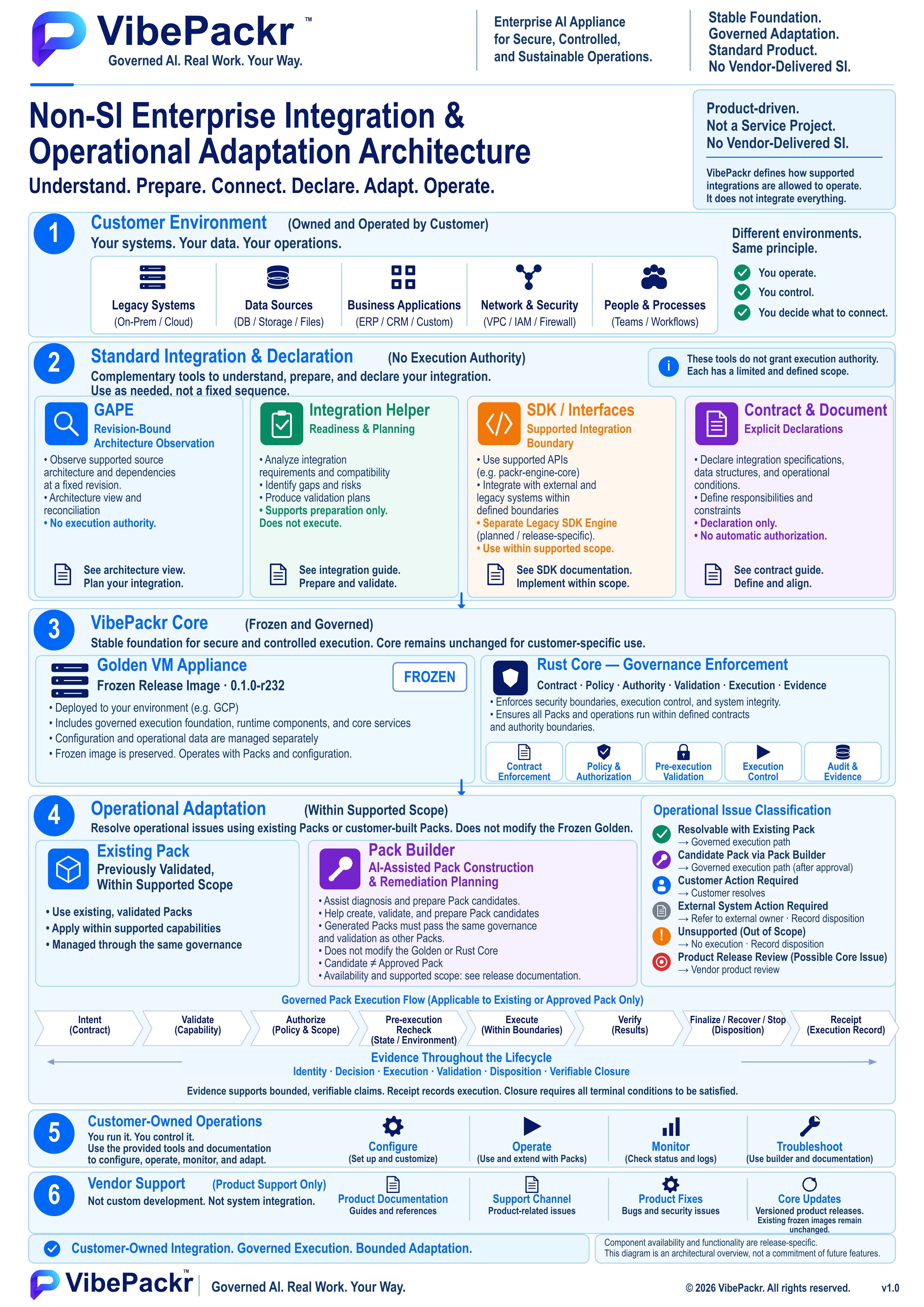
Non-SI integration & operational adaptationView the complete architecture overview
Non-SI Enterprise Integration and Operational Adaptation Architecture. Six layers cover the customer environment; GAPE, Integration Helper, SDK interfaces and declarations; the frozen r232 appliance and Rust core; Existing Packs and Pack Builder candidates; customer-owned operations; and product support. Includes the governed Pack execution lifecycle and issue classifications.
Architecture overview. Component availability and supported scope are release-specific. Read the Architecture guide → Open the high-resolution PNG → Download SVG Open SVG
ILLUSTRATIVE WORKFLOW

“Generate the September financial report.”

Start with one authorized source, a defined reporting period and an intended recipient. Evaluate the request before allowing it to run.

An illustrative evaluation, not a certified reporting workflow or connector claim.

Walk through the example →

Then follow an actual recorded Headless run →

  1. Define the requestSpecify the source, period, recipient and permitted transformations.
  2. Check authority & scopeCheck applicable policy and required approval. If not permitted, do not execute.
  3. Execute within the boundaryRun permitted work through the supported, governed path.
  4. Validate & reviewCheck the outcome against defined criteria and retain evidence. Failed validation or incomplete evidence is not success; human acceptance remains separate.
WHAT VIBEPACKR INCLUDES

Prepare the Work. Understand the context. Govern execution.

Three capability groups, not a mandatory pipeline. Use the preparation tools relevant to your supported Work; they do not create execution authority.

DEFINE & PREPARE

Define & Prepare

Contract captures technical intent, scope and constraints. Document support brings reviewed material and its identity into Work preparation.

Document Supporter names this role, not an established standalone module or a legal-contract parser.

UNDERSTAND & INTEGRATE

Understand & Integrate

GAPE reconciles snapshots and examines explicitly scoped, committed Git blobs for bounded Rust/Tauri relationships, with offline review views. Integration Helper uses snapshots and independent bindings to prepare binding and validation plans.

Preparation does not register, bind or authorize execution.

Read the supported scope →
GOVERN & EXECUTE

Govern & Execute

Packr Engine owns protected governance and execution decisions for supported Work. Validation checks the outcome; evidence and technical receipts support review.

Controlled execution or denial stays distinct from human acceptance.

Use the optional SDK Engine to generate local adapter candidates. Part.5 covers authoring; full Enterprise integration requires its own supported implementation and validation. Read the SDK distinction →

Use Headless for terminal and automated workflows, and PackrGUI for desktop interaction. VMAdmin, PacktoryAdmin, local asset management, runtime selection, status and diagnostic tools support their documented tasks. Hosted sharing is planned; Remote Rescue transport is disabled. Check your release documentation for availability and setup.

WHY EXECUTION NEEDS ITS OWN BOUNDARY

A capable agent still needs permission.

Rolling back software does not necessarily undo the changes it caused. When AI can change data or trigger an operation, permission for that specific work matters before it runs.

IDENTITY & ACCESS

Who is acting, and what can they access?

Your identity and access controls establish principals and resource permissions.

SECURITY

Does this activity present a threat?

Your security controls inspect and restrict activity within their configured scope.

OBSERVABILITY

What is happening?

Your logs and monitoring help inspect activity and investigate outcomes.

VIBEPACKR · EXECUTION AUTHORITY

May this exact work execute now?

For supported Work routed through VibePackr, Packr Engine checks the required authority, policy and scope before execution. Existing enterprise controls keep their responsibilities.

Understand identity and execution authority →

These responsibilities can overlap across products. This is a role map, not a competitor capability ranking.

AGENT COMPROMISE & EXECUTION AUTHORITY

A compromised agent
does not grant itself authority.

For supported Work routed through VibePackr, applicable authority, policy and scope remain conditions for execution. Capability alone does not grant permission.

  1. Check the conditionsIdentity, scope, policy and approval where required govern supported Work. Unmet required conditions deny execution.
  2. Review the purpose and resultAuthorized execution still needs review. Records support a decision; they do not grant approval.
  3. Keep operations with their ownerThe customer operates the appliance. Product controls do not transfer customer operations to VibePackr.

A control-boundary explanation for supported routed Work—not proof that every attack is contained or that every tool and operating-system action is intercepted.

HEADLESS EXECUTION · HUMAN VISIBILITY

Two ways to request.
One governed boundary.

Supported Headless workflows run without keeping PackrGUI open. People can use PackrGUI to request Work, inspect progress and review results; the governed engine owns permission and execution decisions.

MACHINE SURFACE

Headless interface

Submit supported, structured Work requests and inspect typed responses.

Read the Headless guide →
HUMAN SURFACE

PackrGUI

Request Work, observe progress, review evidence and configure within delegated scope.

Explore the workspaces →

Requests reach the governed boundary

PACKR ENGINE

Check authority. Enforce scope.

Evaluate required authority, policy and scope for supported Work. Execute within the permitted boundary, or deny the request.

Inspect the recorded outcome

Permitted work

Review execution results, validation and the associated evidence.

Denied work

Inspect the reported reason before deciding the next authorized step.

Responsibility diagram. A client request does not grant authority. Validation and technical receipts remain separate from human acceptance.
RECORDED LOCAL RUN · R234 · 4 OCT 2026

Follow one Work from input to report.

Read the retained sequence: an input is rejected, its state is checked, the input is corrected, and one Work produces a validated report.

In this recorded example, VibePackr returned validation PASSED while human acceptance remained pending. Follow the steps to understand the workflow, then complete setup and validation for your own deployment.

Where preparation fits: Understand → Prepare → Govern → Execute → Prove

A reading sequence, not an automatic software pipeline. Context and preparation are separate from actual governed Work. Capability ≠ Authority.

  1. UnderstandIdentify authorized context, technical declarations and bounded observations.
  2. PreparePrepare supported connection candidates. Preparation does not enable execution.
  3. GovernEvaluate the specific Work, applicable policy, scope and required approval.
  4. ExecuteRun supported, authorized Work through the protected Packr Engine.
  5. ProveBind evidence to declared checks. A receipt is not business acceptance.

Declaration ≠ Discovery ≠ Preparation ≠ Registration ≠ Binding ≠ Authority ≠ Execution.

Explore the detailed operating model →
ENTERPRISE CONTEXT

How VibePackr fits your enterprise.

Keep your models, agents and surrounding controls. Understand where governed execution fits—and which responsibilities remain separate.

Three-band enterprise role map: AI Capability, a purple VibePackr Authority Boundary owned by Packr Engine, and Real-World Effect. Includes ten ecosystem categories, six protected responsibilities, seven illustrative industry contexts, and Intent, Proposal, Authority, Execution, Evidence and Acceptance as a conceptual lifecycle.
ILLUSTRATIVE CAPABILITY / AUTHORITY MAP

Capability is not authority.

AI can propose. Execution requires governed authority. Explore the boundary between AI capability and real-world effects, and why a successful technical result is not sufficient evidence of authorization.

Explore the detailed reference →
Detailed enterprise responsibility view showing optional preparation, declared policy references, Packr Engine governance, admission or denial, controlled execution, result validation, bound evidence, surrounding controls and an optional local SDK implementation candidate with separate review and registration.
CONCEPTUAL RESPONSIBILITY VIEW

What does VibePackr govern?

A supported request reaches the protected Packr Engine with declared context, scope and applicable authority. Existing identity, security and observability remain surrounding controls. Preparation, execution, outcome review and human acceptance are related but separate responsibilities.

Explore the detailed reference →

Vendor names and logos identify illustrative examples, not confirmed integrations, partnerships, endorsements or certifications. Categories overlap. Availability and supported interfaces require confirmation. Then compare the deployment and trust boundaries →

TARGET OPERATING MODEL

Your environment. Your execution authority.

The customer-controlled appliance model places VibePackr's governed Work boundary in your environment. External AI services remain separate processing and trust boundaries; their use depends on supported paths, configuration and applicable policy.

  • Operate the boundary

    The target is a customer-operated, single-tenant appliance. Confirm the supported platform, tenancy boundary and operational responsibilities for your evaluation.

  • Govern supported Work

    Check authority, policy and scope for Work routed through the supported path. Model capability and access credentials do not by themselves authorize every operation.

  • Make external processing explicit

    Selecting an external AI service may involve external data processing. Identify the data flow, provider terms and relevant controls before use.

Provider controls vary by service and deployment. Availability, supported scope and release-specific validation require confirmation. This diagram does not change product, support, Marketplace or Legal status.

Illustrative comparison of provider-managed multi-tenant SaaS and VibePackr's customer-controlled target model, with external AI providers outside the customer boundary, twelve comparison categories, four evaluation considerations and a release-assurance checklist.
Figure 24 · Complete composition. Open the image to zoom, or read the accessible comparison.
An iceberg, with its visible peak supported by a much larger structure below the water.
BENEATH THE VISIBLE INTERACTIONSupported by explicit execution boundaries.Read the detailed iceberg reference →Conceptual illustration, not a product screenshot.
ONE RECORD, DIFFERENT QUESTIONS

Evidence supports a decision. It does not make it.

Engineering

What was requested, what ran, and which artifact resulted?

Security

Which authority and scope permitted the operation?

Operations & review

What evidence supports the outcome, and what remains to be accepted?

UNDERSTAND THE SCOPE

What this site describes

Evaluation baseline

Bounded technical scope

Our guides cover technical evaluation within the documented interfaces and versions. Before production use, confirm the supported release, installation prerequisites and applicable support agreement.

Illustrative examples

Understand the workflow

Workflow stories and sample JSON explain the model. They are not customer production records or evidence of a completed deployment.

Target architecture

See the direction

Plan a customer-operated deployment using our release-specific prerequisites. Part.5 covers local SDK authoring, and the Packtory guides cover local asset management. Full Enterprise integration requires a supported implementation; hosted sharing remains planned.

ENTERPRISE REFERENCES

A clearer view of what matters.

Examine detailed source-based architecture diagrams, execution responsibilities and operating models, with full-resolution views and readable explanations.

Architecture & components →Execution & responsibility →Evaluation & operations →Future concepts — not current availability →
PRODUCTIZED ASSISTANCE · NON-SI

Make repeatable preparation reusable.

Use declarations, bounded preparation and reviewable examples to give teams a consistent starting point. Non-SI means putting repeatable work into the product and its guides.

  1. 01 / DECLARE

    Make the request explicit.

    Use Contract and Document examples to describe the work, expected output and declared limits.

    Explore declaration examples →
  2. 02 / PREPARE

    Review the connection plan.

    Within supported scope, GAPE reconciles context and Integration Helper prepares binding and validation plans. Preparation does not register, bind or authorize execution.

    Inspect the Helper JSON examples →
  3. 03 / EVALUATE

    Keep a comparable review record.

    Use the PoC guide to define one workflow, its prerequisites, expected checks and observations before expanding the evaluation.

    Start a bounded PoC →

Give customer-specific work a clear owner.

Custom adapters, migrations, workflow design, production cutover and operations still need named customer or implementation owners. Product defects remain within applicable product support scope. This model does not promise zero integration effort or a measured time saving.

Review shared responsibility →
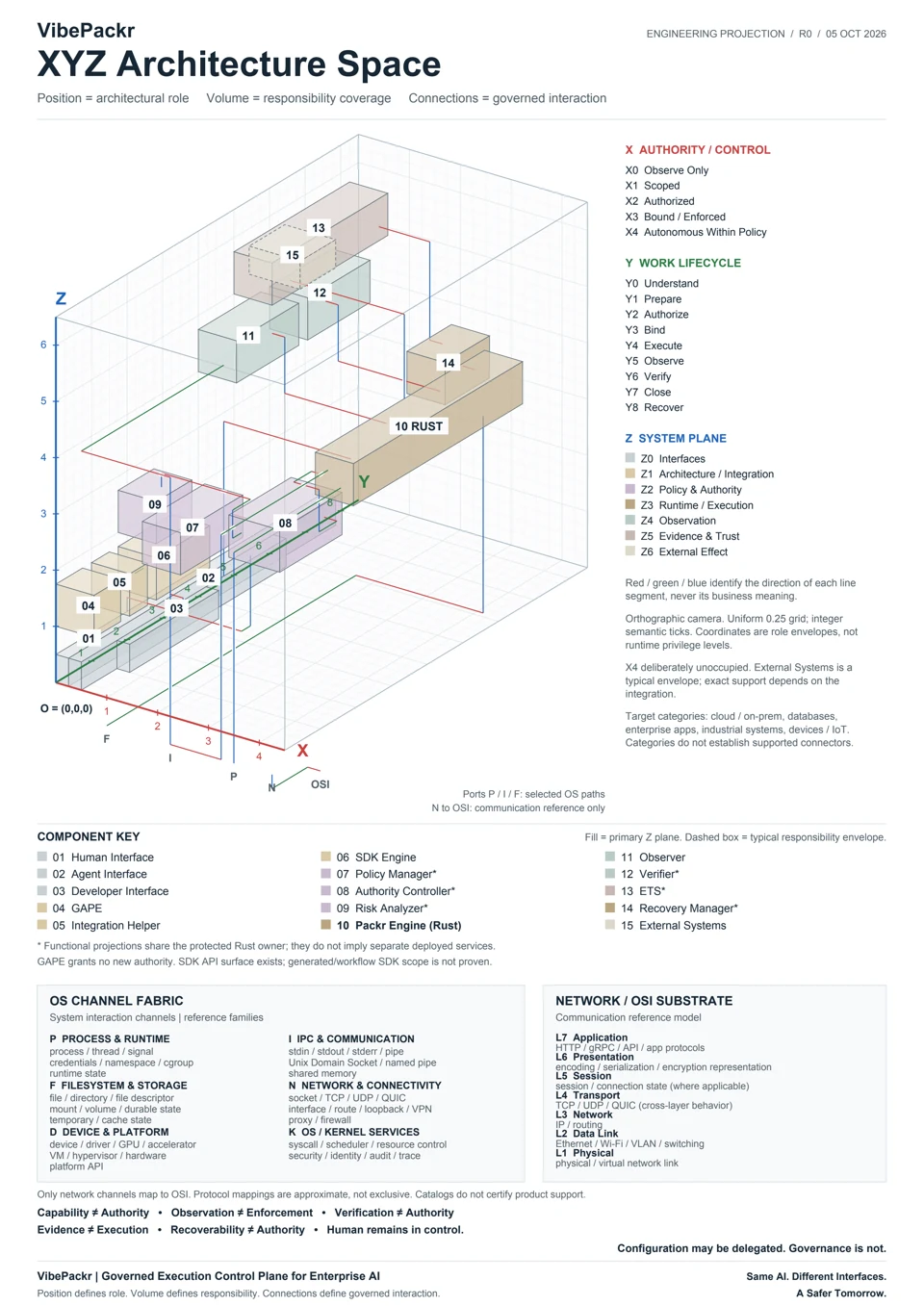
XYZ architecture diagram mapping authority, lifecycle and system planes. Open the reading guide and enlarge the diagram.
ARCHITECTURE IN THREE DIMENSIONS

Find the role.
Understand the responsibility.

Where does preparation end? Who governs execution? How do observation, evidence and recovery relate? Explore 15 roles across authority, work lifecycle and system planes.

Position identifies a role. Volume shows qualitative responsibility coverage. Connections show governed interactions.

A supplementary responsibility projection, with readable explanations and an enlarged view. The primary operating model and supported interfaces remain the reference for implementation scope.

Explore the XYZ architectureRead Figure 27 in the whitepaper → Korean PDF (KR)
Technical Whitepaper · EN | KR · 18 October 2026

VibePackr — Governed AI Execution for Enterprise Work

Architecture, enterprise knowledge assets, Work Authority and practical adoption. The English and Korean editions share 29 chapters and 26 current SVG diagrams, with direct reading paths to Parts 1–8 and the practical guides.

English: 66 pages · 4.5 MB | Korean: 66 pages · 4.7 MB · PDF · 18 October 2026

Body text and captions are localized; SVG diagram labels remain English in both editions.

Edition details and SHA-256 checksums

ILLUSTRATIVE ADOPTION SCENARIOS

Different starting points. One focused evaluation.

These are discussion scenarios, not customer case studies or promises of integration effort.

You already use an AI platform

Choose one agent workflow and identify which actions need explicit permission. Evaluate integration coverage before expanding scope.

Your tools span several systems

Map the request, policy owner, execution target, and evidence path. Start with a bounded workflow rather than a platform replacement.

Your team needs stronger review

Define the evidence and acceptance criteria with security and operations. Product records support review; they do not substitute for legal or regulatory assessment.

Before you evaluate

Does VibePackr replace my AI tools?

No. The architecture is designed to work alongside existing tools. Only requests routed through supported integrations are in scope; it does not imply universal interception of every tool action.

Does an evidence record guarantee a correct result?

No. Tamper-evident records help examine what happened. Business correctness, human acceptance, and contractual obligations remain separate.

Is this a managed operations service?

The draft support model is single-tenant, customer-controlled, and Non-SI. Contracted support scope and responsibilities are defined in the applicable agreement. Read the draft SLA.

Where are the technical diagrams?

The Architecture guide preserves the detailed BT-OS, headless execution, assurance, and target-domain material.

GET STARTED

Find your next step.

Use a guide to plan an evaluation or review. Open Documentation for the product surface, command or example you need.

TECHNICAL EVALUATION

Start with one governed workflow.

Tell us which AI tools you use, what actions need approval, and where the work runs. Compare the recorded R234 run, start the 11-step PoC guide, or ask about the evaluation baseline and supported integration scope.

Request an EvaluationStart the 11-Step PoC Guide →Inspect Recorded R234 Run →

Clicking “Request an Evaluation” opens your local email client addressed to support@vibepackr.com; sending an email does not automatically create a support case or provision an environment. Please do not include credentials, customer data, or confidential logs in your initial email.

Review the draft support SLA